
You want a keyboard that travels light and types right. I’ve tested these on planes and café tables. Your fingers feel the difference fast.
Foldable boards like ProtoArc XK01 and XK04 slip into any bag. The hinge feels firm and the keys give a soft click. It feels like packing a notebook that types. Great for tight desks. Think of it as your pocket office.
Prefer a richer feel. I reach for Keychron K2 or Ajazz AK820 Pro. These 75 percent boards pack solid switches and a dense layout. Keys sound crisp and a bit thocky. You feel each press like tapping a drum. They add weight but reward long sessions.
Need silence. Logitech Pebble Keys 2 keeps things calm. The keys feel smooth and quiet like tapping paper. Coworkers stay happy. Your focus stays sharp.
Here is how I choose fast.
- Size, foldable or compact frame for bags
- Weight, lighter builds ease daily carry
- Battery life, longer runs mean fewer charges
- Layout, full keys or 75 percent for balance
- Connectivity, Bluetooth or multi device pairing
Pick what fits your routine and space. I’ve found the right board turns any spot into a clean workspace.
ProtoArc XK01 Foldable Bluetooth Keyboard
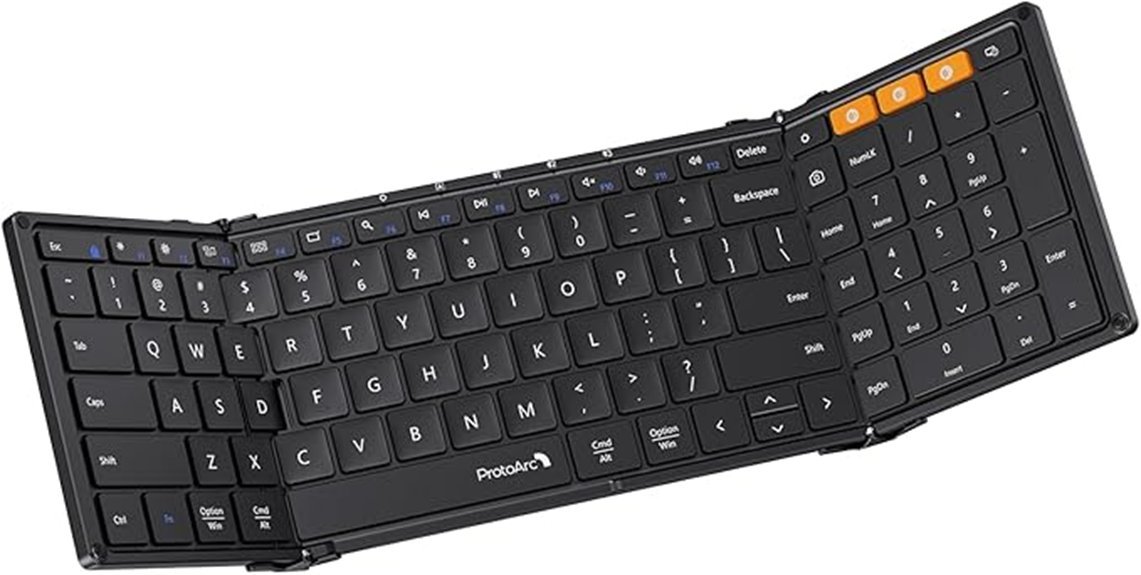
If you want a full size typing feel on the go, I keep coming back to the ProtoArc XK01 *Foldable Bluetooth Keyboard*. I’ve used it on trains and at cafés. It feels like carrying a slim notebook. Open it and you get a true 105 key layout. It includes a number pad and full function row.
The tri fold design folds down to 8.46 by 4.68 inches. It slips into a bag with ease. The hinge feels solid in hand. I hear a soft snap when it locks in place. Keys use scissor switches, so each press feels crisp and quiet. It sounds like a soft tap, perfect for shared spaces.
You can pair three devices with *Bluetooth 5.1*. I switch from laptop to tablet in seconds. It works with Windows, macOS, iOS, and Android. USB C charging keeps things simple. Auto sleep helps stretch battery life to 150 days. That kind of stamina feels like a marathon runner.
Shortcut keys speed up daily work. Fn plus ESC toggles modes fast. The flat profile stays steady on most desks. It sits like a calm lake, smooth and stable.
*Best For:* Travelers and remote workers who want a full size keyboard in a compact form.
*Pros:*
- Full 105 key layout with number pad and quiet scissor keys
- Tri fold build with aluminum hinge rated for 10000 folds
- Multi device pairing with fast switching and long standby
*Cons:*
- Flat shape feels less angled during long typing sessions
- Separate mouse helps with full control
- Folding takes a few seconds to set up
ProtoArc Foldable Bluetooth Travel Keyboard XK04
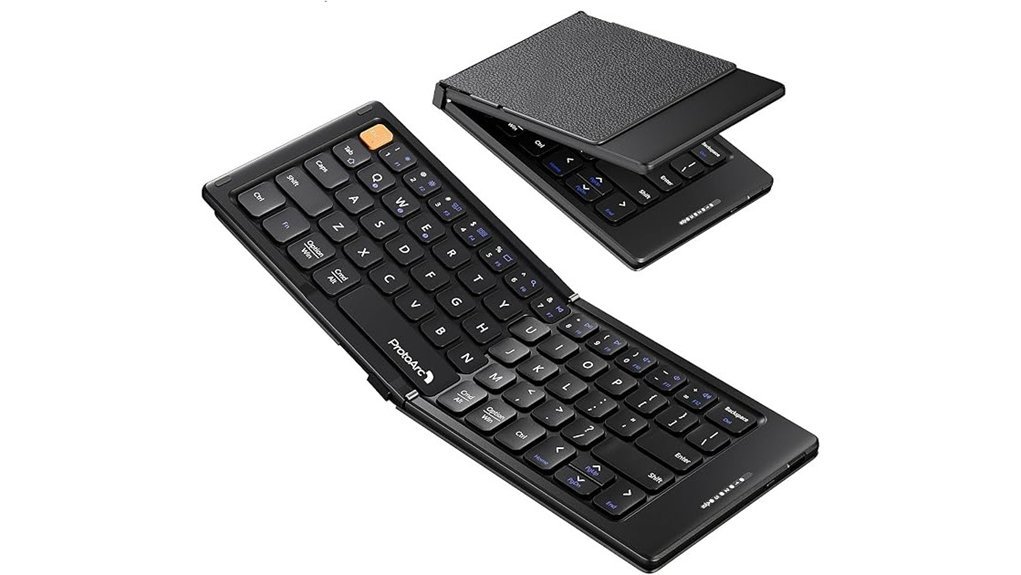
Frequent travel tests your gear hard. I carried the ProtoArc XK04 on flights and in cafés. It feels light at 7.8 ounces. It slips into a pocket like a folded map. The hinge snaps open with a soft click. You get a 10.76 by 4.07 inch layout that fits tight trays. It turns any seat into a small command center.
Keys feel crisp under your fingers. Each 0.55 inch key gives a quick bounce. I typed emails with a soft tap sound. It keeps a steady rhythm like a metronome. Bluetooth 5.1 holds a stable link up to 33 feet. You switch across three devices in seconds. Pair a phone then a tablet then a laptop. It just flows.
Charging stays simple. USB C fills the battery in two hours. Auto sleep stretches standby to 150 days. I opened it after weeks and it woke fast. It turns any spot into a productive workspace for travel or study or remote work. Like a Swiss Army knife for typing.
Best For: frequent travelers and students and remote workers who want a light keyboard for quick typing on phones or tablets.
Pros:
- Ultra compact foldable build that fits pockets or small bags
- Bluetooth 5.1 with fast switching across three devices
- Long battery life with quick USB C charging and 150 day standby
Cons:
- Small keys feel tight during long sessions
- Suits quick tasks and light writing
- Missing extras like backlight or trackpad
EPOMAKER Ajazz AK820 Pro Wireless Mechanical Keyboard

Compact and ready for the road. I’ve used the EPOMAKER Ajazz AK820 Pro on flights and in cafés, and it feels like a small studio under your fingers. The 75% layout stays slim at 12.87 by 5.35 inches. A *gasket mount* with a flex cut PC plate gives a soft cushioned press and a low thock sound. The TFT screen shows battery time and mode at a glance. RGB lighting glows with 1.6 million colors from south facing LEDs. You switch fast between Bluetooth 5.1, 2.4GHz, or USB C. The 4000mAh battery keeps you typing for days. Hot swap Cherry MX Red switches feel smooth and light. You get 81 keys with media control and Mac or Windows support. It travels like a carry on hero.
Best For: Travelers and remote workers who want a compact mechanical keyboard with rich feel and flexible links.
Pros:
- *Gasket mount* and flex cut plate give a soft quiet press, like typing on a pillow
- Triple link options with a 4000mAh battery keep you connected on planes and in cafés
- Hot swap switches RGB glow and a TFT screen add a custom vibe you can feel and see
Cons:
- 75% layout feels tight for heavy number entry
- TFT screen serves as a fun extra with light daily use value
- Cherry MX Red switches feel very light for fans of tactile bumps
Quick Specs:
- Layout, 75% with 81 keys
- Size, 12.87 by 5.35 inches
- Mount, gasket with flex cut PC plate
- Switches, hot swap Cherry MX Red
- Lighting, RGB with south facing LEDs
- Screen, TFT for status info
- Connectivity, Bluetooth 5.1 2.4GHz USB C
- Battery, 4000mAh
I type and it sounds like soft rain on a window. You feel the give in each press. It’s a small board that punches above its weight.
Keychron K2 75% RGB Wireless Mechanical Keyboard V2
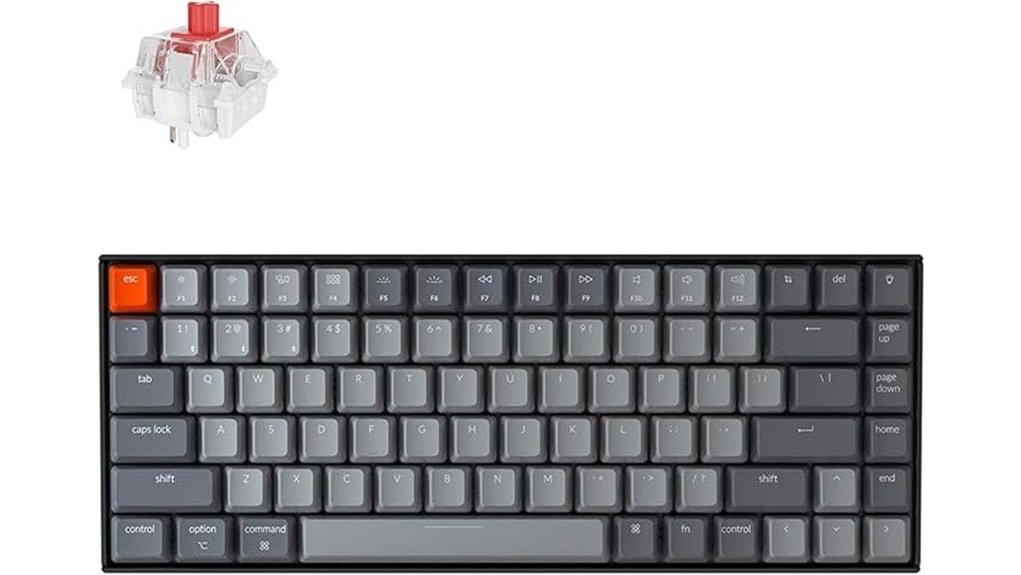
Designed for *multi device life*, I switch between my laptop, tablet, and phone in seconds. It feels like flipping channels on a remote. The 75% layout keeps arrow keys and trims desk clutter. Your hands stay close and relaxed. The frame tilts just right, so long sessions feel smooth.
You get Bluetooth 5.1 for clean wireless use. I also plug in with USB C when I want zero lag. The connection feels stable and quick. The 4000 mAh battery runs up to 72 hours. I type for days before I reach for a cable.
The keys feel crisp and slightly springy under your fingers. You hear a soft click or thock based on the switch. It adds a rhythm to your typing. RGB lighting glows through the legends with a soft shine. You can dim it for late nights or keep it static for focus. Switches last for 50 million presses, so this board stays with you for the long haul. NKRO works in wired mode for full accuracy.
Best For:
You want a compact wireless mechanical keyboard that travels well and handles multi device work with ease. It punches above its weight.
Pros:
- Fast switching across 3 devices with Bluetooth 5.1
- Compact 75% layout keeps key function and saves space
- 4000 mAh battery delivers up to 72 hours of use
Cons:
- Wireless mode uses 6 key rollover which suits casual typing
- Compact layout feels tight at first for full size users
- RGB lighting draws attention in dark rooms
RAYMCRAFT iPad 10th/11th Keyboard Case with Trackpad
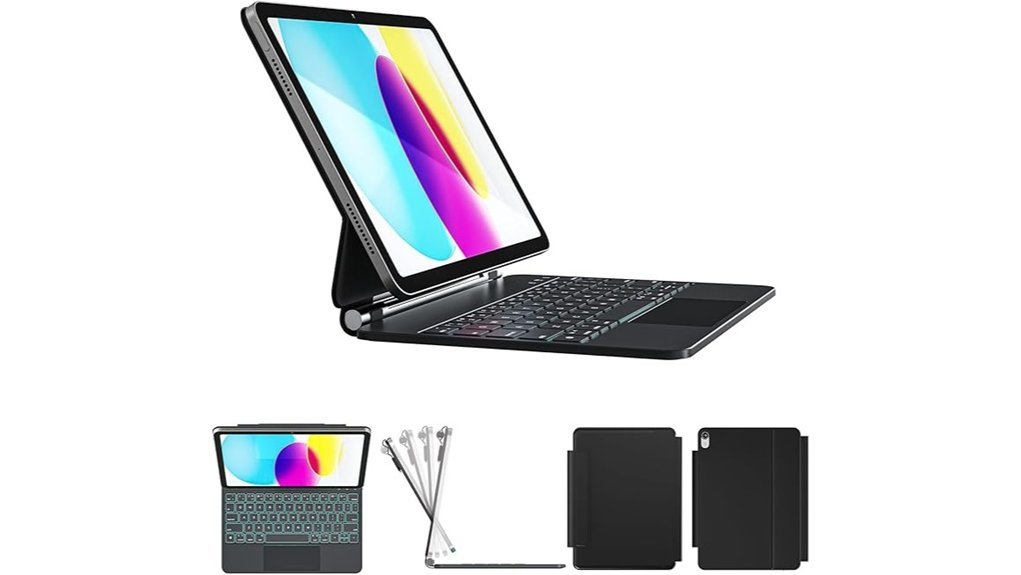
Students and remote workers will love this all in one laptop style setup. I felt the firm snap as the iPad locked in place. It holds the 10th Gen and 11th Gen models with a snug grip, so you should check your device first. The SemiSi tech surface feels smooth and wipes clean with ease. The soft inner lining cushions your screen like a gentle sleeve. A magnetic buckle clicks shut with a quiet snap. The Apple Pencil slot keeps your stylus close at hand.
Flip it open and it stands ready in seconds. You can tilt it to your sweet spot for typing or browsing. The backlit keyboard glows with 11 colors and shifts brightness on command. Keys feel springy and quiet under your fingers. I typed for hours with steady comfort. A full row of PadOS shortcuts speeds up daily tasks. The responsive trackpad tracks every swipe with crisp control. It feels like having a mini laptop in your bag, a real Swiss army knife.
Best For: Students and remote workers who want a laptop style typing setup on iPad 10th or 11th Gen.
Pros:
- Laptop style build with trackpad boosts workflow speed
- Adjustable stand and glowing keyboard improve comfort day or night
- PU leather shell resists stains and feels smooth to the touch
Cons:
- Fits iPad 10th and 11th Gen models only
- Adds noticeable weight in your bag
- Backlight and trackpad use extra battery power
Logitech Pebble Keys 2 K380s Bluetooth Keyboard

For multi device users, I keep reaching for the Logitech Pebble Keys 2 K380s. It lets you switch between three devices in a blink. Tap the Easy Switch buttons and you jump from laptop to tablet to phone. It feels like flipping light switches.
Pairing works across Windows, macOS, iPadOS, Android, and Chrome OS. I tossed it in my bag and forgot it was there. The slim body feels smooth and cool to the touch. Colors add a playful vibe that stands out on a desk.
Typing feels soft and quiet. The scooped keys hug your fingertips. Each press gives a gentle tap sound like rain on glass. You get laptop style comfort without bulk.
I used the Logi Options app to tweak shortcuts. You can map 10 Fn keys and speed through tasks. It saves time once you set it up.
Battery life stretches up to three years. That feels like set it and forget it. The use of recycled plastic adds a greener touch for daily travel.
Best For:
You juggle multiple devices and want a compact keyboard that keeps up.
Pros:
- Easy switching between three devices across major operating systems
- Slim and light build with quiet laptop style keys
- Long battery life plus customizable shortcuts
Cons:
- No backlight for dark rooms
- Uses replaceable batteries instead of a built in rechargeable pack
- Compact layout feels tight if you love full size boards
ProtoArc Foldable Keyboard and Mouse Combo XKM01

Frequent travel pushes your gear hard. I’ve used the ProtoArc XKM01 on planes and in cafés. It feels like a full desk shrunk to fit your bag. The 105 key layout gives you space to breathe. Your fingers land where they expect. Spreadsheets flow. Code feels smooth.
The keys feel soft with a quiet tap. Think library calm. The fold line sits in the middle like a book spine. You feel it at first. Your hands adjust fast. The included mouse glides well on most surfaces. Clicks stay hushed. DPI settings let you dial in speed.
You can pair three devices and switch in a blink. I jump from laptop to tablet in seconds. It keeps pace like a well trained assistant. The hinges feel solid in hand. Aluminum adds a cool touch. The case keeps dust out. The built in stand props your phone at eye level.
Battery life lasts through long trips. I went days without a charge. That peace of mind matters on the road. It’s a carry kit that pulls its weight.
Best For: Travelers and mobile pros who want a full size typing feel with easy device switching in a compact kit.
Pros:
- Full 105 key layout with number pad boosts speed for data work
- Multi device pairing lets you switch fast across laptop and tablet and phone
- Foldable build with aluminum hinges feels sturdy and travel ready
Cons:
- Bulk feels higher than slim travel boards
- Center crease takes a short adjustment period
- Mouse shape suits short sessions more than long desk days
Logitech Pebble Keys 2 K380s Bluetooth Keyboard
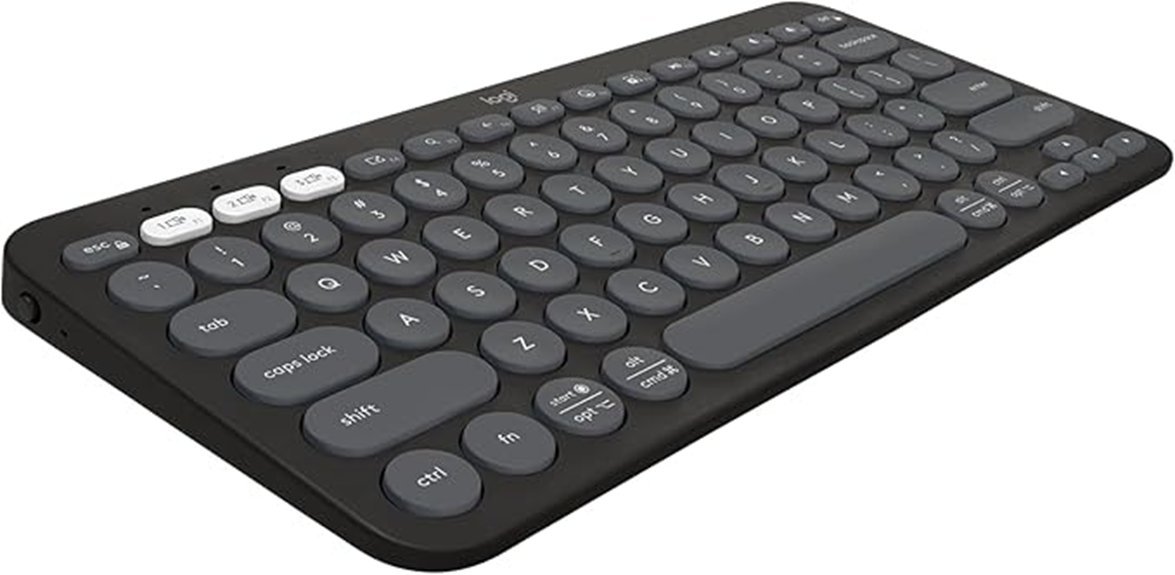
If you juggle devices all day, this *compact Bluetooth keyboard* keeps pace. I’ve used it across a laptop, tablet, and phone. It switches like flipping a light.
Pair up to three devices with ease. Tap the Easy Switch buttons and move on. You stay in flow. It works with Windows, macOS, iPadOS, Android, and Chrome OS.
Typing feels soft and quiet. The scooped round keys hug your fingertips. It sounds like a gentle whisper in a shared room. Perfect for coffee shops.
You can tweak shortcuts in Logi Options. I set mine for quick screenshots and volume. Small change, big gain. It feels like a shortcut factory.
Battery life stretches far. I got close to three years in light use. That’s set it and forget it. The plastic uses recycled material and feels smooth to the touch.
The design looks slim and fresh. It slips into a bag with zero fuss. Colors add a bit of fun. Think of it as a pocket sidekick.
Batteries come in the box. You power up and start typing right away.
Best For:
People who switch between devices and want a *quiet wireless keyboard* that travels light.
Pros:
- Fast multi device pairing with smooth switching
- Quiet typing with soft scooped keys
- Long battery life up to three years
Cons:
- No backlight for dark rooms
- No number pad for heavy data entry
- Flat shape gives light wrist support for long sessions
TECKNET Wireless Keyboard and Mouse Combo 2.4GHz
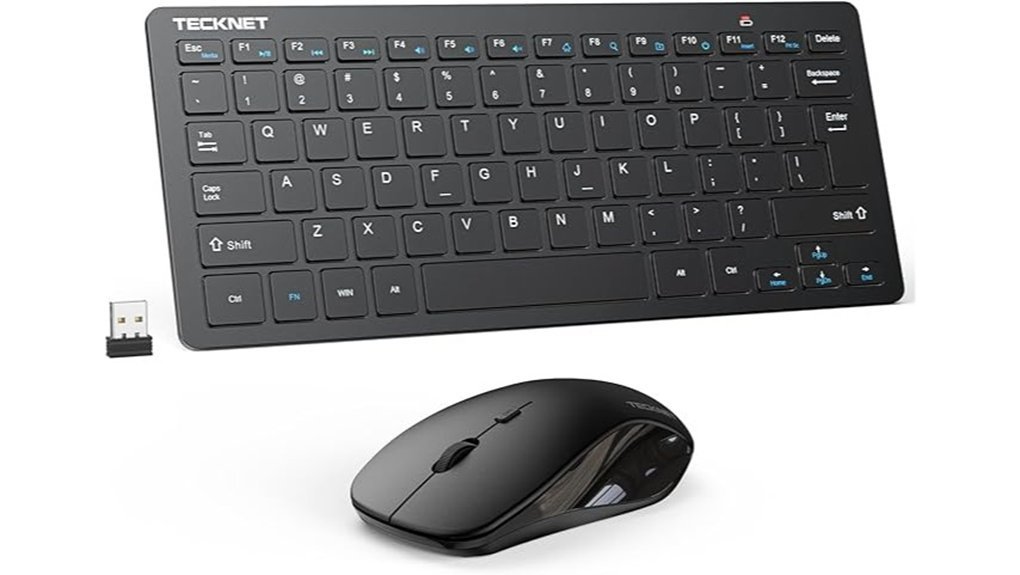
Need a travel setup that feels light in your bag? I’ve used the TECKNET Wireless Keyboard and Mouse Combo on trains and in cafés. It slips in like a paperback. No bulk. No fuss.
You feel the *scissor switch keys* snap softly under your fingers. Each press stays crisp. The mouse clicks sound like a whisper in a quiet room. Think library calm. It keeps your focus locked in.
The 2.4GHz link stays steady across a room. I walked about 49 feet and still typed without lag. One nano receiver runs both devices. Plug it once and you’re set. Easy as flipping a switch.
It plays nice with Windows, Mac, Chrome OS, and Android TV. I swapped between a laptop and a media box in seconds. Auto sleep kicks in after idle time. Your batteries last longer without effort.
Build quality feels solid in hand. The plastic has a smooth matte touch. No creaks. You also get a 36 month warranty. That adds peace of mind for daily use.
Best For: You want a compact wireless keyboard and mouse for travel and study. It fits tight spaces and stays quiet in shared rooms.
Pros:
- Slim build slides into any backpack with ease
- Quiet keys and soft clicks keep noise low
- Single USB receiver keeps your desk clean
Cons:
- Uses AAA batteries which need swaps over time
- USB receiver only connection limits device pairing
- Compact layout feels tight for large hands
Portable Foldable Keyboard and Mouse Combo Bluetooth 4-in-1
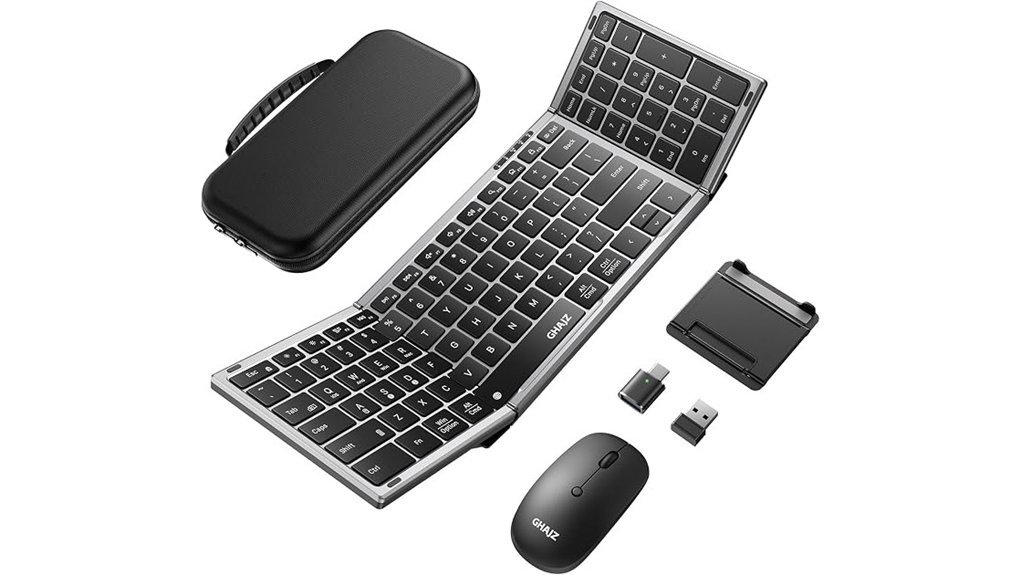
A great pick for multitaskers, I’ve used this foldable keyboard and mouse combo on flights and in cafes. It feels like a Swiss army knife for your desk. You connect up to three devices in seconds. Tap a key and jump from laptop to phone. Bluetooth handles most setups. A USB A receiver and Type C adapter add backup.
It unfolds with a firm click. The hinge feels tight in your hands. Keys sound soft and low. You type without that loud clack. The case feels tough and smooth. It also props your phone at a clean angle. Battery life stretches far. I saw close to 200 days on standby. Charging uses USB C. Setup stays quick and simple.
Best For: You juggle a laptop tablet and phone daily. You want quiet typing on the go. You need one kit that travels light and works fast.
Pros:
- Fast switching across three devices with Bluetooth or USB
- Full size layout that folds small and travels well
- Quiet keys with a soft touch and long standby battery
Cons:
- Hinge needs a gentle close to keep it smooth
- Charging works best with standard USB C bricks
- Body feels a bit thick in a tight bag
Why I Recommend It:
I trust it for mobile work. It packs small yet works big. Like a pocket tool that punches above its weight. You get steady typing and clean switching wherever you land.
Factors to Consider When Choosing Portable Keyboards
When I test a portable keyboard, I start with size in my bag. Slim bodies slide in with ease. Fold designs feel like a pocket knife. *Compact wins for travel.*
Next I check weight in hand. Light boards feel like paper. Heavier ones press like a brick. You feel it by day’s end.
Layout shapes your flow. Full size gives you room to breathe. Mini layouts feel tight. I type fast on keys that click with a soft snap. *Your fingers know fast.*
Connectivity matters in real use. Bluetooth pairs in seconds. Multi device switch saves time. I tap and jump from phone to tablet like a DJ on a deck.
Battery life keeps you moving. Long life means fewer plugs. I like a board that hums for weeks. It feels like a marathon runner that keeps pace.
Size And Foldability
Size And Foldability
Portability sounds easy. It decides your daily carry.
I check folded size first. Small numbers win. The ProtoArc XK01 folds to 8.46 x 4.68 x 0.78 inches. It slides into a sling with room to spare. You feel the smooth shell in hand. It feels like a slim notebook.
I also watch the hinge action. It should feel tight and quiet. A soft click tells me it will last. Cheap hinges squeak and wobble. That kills trust fast.
Pick a fold that fits your space. Cafés get cramped. Plane trays feel tiny. A tri fold opens wide and feels like a full board. Your fingers land with less strain. A flat profile keeps the board steady on bumpy tables.
Palm size models help on the go. The ProtoArc XK04 keeps things light. You still get a clear key layout. It feels like a pocket tool that punches above its weight. Like a Swiss Army knife for typing.
What I check every time:
- Folded dimensions, smaller is better
- Hinge feel, firm and quiet
- Layout when open, full width helps speed
- Profile height, low sits steady
- Weight, light feels easy all day
Choose a smart fold. Your bag stays light. Your typing stays fast.
Weight And Portability
Weight and Portability
Weight hits you the moment you lift your bag. I feel it after a long walk through a terminal. You will too. Aim for *under 8 ounces*. It feels like a feather in your pack.
Thin matters. Think *0.8 inches or less*. It slips into a sleeve with a soft slide. No bulk. No fight.
I like folding builds. Tri fold designs shrink fast. They pack like a deck of cards. That trick saves space every trip.
Durability shows up over time. Hinges should feel tight and smooth. You want a firm click with each fold. Cheap builds creak like dry twigs. Solid ones stay quiet.
Extras help on the move. A slim case keeps dust away. An integrated stand props your phone at eye level.
Here is what I look for:
- Weight under 8 ounces
- Thickness at or below 0.8 inches
- Fold or tri fold design
- Firm hinges with a clean click
- Protective case or built in stand
You will notice the difference in a rush. Light gear keeps your stride easy. It feels like carrying air.
Balance still matters. Light should pair with strong materials. That combo lasts longer and feels better in hand. Portability should feel *effortless* every time you pack.
Keyboard Layout Type
Keyboard Layout Type
How much space do your fingers need? I feel it the second I start typing. Keys either breathe or crowd.
Full size boards feel like a wide desk. You get every key plus a number pad. I hear a steady rhythm when I crunch numbers. It suits spreadsheets and data entry.
Compact 75% layouts trim the fat. You keep the core keys in a tighter frame. I like the snap of fast travel typing. It slips into a bag like a paperback.
Mini boards push the idea further. Keys shrink and clusters vanish. You lean on shortcuts and muscle memory. It feels like driving a sports car on a narrow road.
Watch the key layout closely. Small shifts change your flow. I notice it when I switch tasks and miss a key.
Some boards fit Mac use or gaming. Shortcuts match the system you use daily. That *click* sound can feel sharp or soft depending on switches.
If you type for hours, comfort matters. Ergonomic boards curve and tilt. Your hands rest like they sit in a hammock.
Quick layout guide
- Full size, best for data entry and finance work
- 75% compact, best for travel and mixed tasks
- Mini 60%, best for tight desks and fast shortcuts
Pick a layout that fits your rhythm. Your fingers will tell you fast.
Connectivity Options
Connectivity Options
I’ve tested keyboards that glide and ones that hiccup. *Connectivity makes or breaks your flow.* You want multi device pairing that lets you switch fast. I tap one button and jump from laptop to tablet. It feels like flipping a light switch. Smooth and instant.
Look for support for at least three devices. Bluetooth works great for clean desks. A USB receiver adds speed and stability. *Easy switch keys save seconds that add up.* You stay in the zone.
Compatibility matters. You use many systems in real life. Pick a keyboard that works with Windows, macOS, iOS, and Android. One board for all gear. That’s the sweet spot.
Flexibility seals the deal. I like keyboards with Bluetooth and 2.4GHz plus USB C wired mode. Wired feels crisp under pressure. You can hear the steady tap with zero lag. Wireless keeps things tidy and free.
Range matters too. Aim for about 33 feet. I walk around a room and keep typing without dropouts. *A solid link feels like a firm handshake.* It stays consistent.
Quick specs to check:
- Multi device pairing, at least 3 devices
- Bluetooth 5.x support
- 2.4GHz USB receiver included
- USB C wired mode
- Range up to 33 feet
- Cross platform support
You get fast input and steady response. Your words appear as you think them. That’s the goal.
Battery Life Span
Battery Life That Keeps Up
I’ve tested keyboards on long trips and busy weeks. You feel the difference when battery life just fades into the background. *Good gear should hum along like a quiet engine.*
Aim for long standby. Some models reach 150 days. That means fewer charges and less fuss.
Auto sleep matters. The board slips into low power when idle. You save juice without thinking.
USB C charging feels fast and clean. Most boards refill in about two hours. You plug in and get back to work.
Bluetooth draws more power. Wired setups sip less energy. You pick based on your setup.
Backlighting eats battery. Bright keys look great yet drain faster. Signal strength also plays a role.
Match the battery to your routine. Travel days need bigger capacity. Desk work needs less.
Quick checks I use
- Standby rating in days
- Recharge time in hours
- Connection type, Bluetooth or wired
- Backlight levels and control
- Battery size in mAh
Choose with intent. You stay powered and focused wherever you go.
Typing Comfort Level
Typing Comfort Level
I’ve tested plenty of portable keyboards, and your fingers tell the truth fast. *Feel matters most.*
Start with key size. Aim for 0.65 to 0.78 inch spacing. Your hands find a natural rhythm here. It feels like a well worn piano.
Switch type shapes sound and touch. Scissor switches stay quiet and soft. You hear a light tap in shared spaces.
Layout drives speed. I prefer full size layouts with function keys and a number pad. You skip odd combos and keep flow.
Angle matters too. An inclined frame lifts your wrists. You feel less strain during long sessions.
Love feedback. I do. Mechanical switches like Cherry MX give a crisp click. Each press feels clear and sure.
Consistency seals the deal. Every key should feel the same. Smooth travel keeps your pace steady and your hands fresh.
Quick specs to check:
- Key spacing, 0.65 to 0.78 inches
- Switch type, scissor or mechanical
- Layout, full size with number pad
- Frame angle, slight incline
- Key travel, even and smooth
A good keyboard fits like a glove. You type faster and stay comfortable all day.
Device Compatibility Range
Device Compatibility Range
I’ve tested keyboards that feel slick at first touch, then trip you up mid task. You want flow. You want *instant switching* that feels like flipping a light switch.
Start with broad platform support. Your keyboard should speak Windows, macOS, iOS, and Android with ease. I press a key and jump screens. No friction. No delay.
Look for multi device Bluetooth pairing. Three devices feels like a sweet spot. Tap a key and move from laptop to tablet to phone. It feels like sliding across ice.
Check physical support across devices. Laptops, tablets, phones. I like a firm key press with a soft thock sound. It keeps your rhythm steady.
Scan the connection options.
- Bluetooth for clean desks
- USB receiver for stable links
- Wired mode for zero lag
Each mode serves a moment. You stay in control.
Layout matters more than most think. Shortcut keys should match each system. Mac keys should trigger Mac actions. Windows keys should follow suit. Your fingers build memory fast.
Switching should feel simple. A clear key or app profile helps you move fast. I want zero guesswork. You keep your pace and your focus.
Pick a board that keeps up. Like a good travel buddy, it adapts without fuss.
Build Quality Durability
Build Quality and Durability****
I’ve tossed travel keyboards into backpacks and carry ons. Weak builds fail fast. Strong ones feel solid the second you touch them.
Start with the frame. *Aluminum hinges* give a cool smooth feel and quiet confidence. I look for ratings above 10,000 folds. That hinge should move like a well oiled door.
Size matters. You want compact and stiff. A tight frame stops flex and keeps typing crisp. It should feel like a small brick in your hands.
Keycaps tell a story. I prefer plastic around 0.65 inches high. They feel soft under your fingers and sound muted. That texture resists shine and wear over time.
Weight stays in check. I aim for under 8 ounces. Light gear travels easy yet still feels planted on a desk. Think feather with a backbone.
Protection seals the deal. A soft PU leather cover feels smooth and grips well. A hard case adds a shell that shrugs off bumps. I’ve heard that dull thud in a bag and smiled because the keyboard stayed safe.
Quick specs I check every time
- Hinge rating above 10,000 cycles
- Frame that resists flex
- Keycap height near 0.65 inches
- Weight under 8 ounces
- Protective cover or case
Treat build quality as your safety net. Good gear takes a beating and keeps typing like day one.
Conclusion
Wherever I go, I pack a portable keyboard that feels like a pocket command center. Keys should feel crisp, with a soft click you can hear and trust. You want steady Bluetooth and fast pairing so work flows like butter. Build quality matters, the shell should feel solid in your hands.
I’ve typed on planes and in loud cafés. You will feel the difference with good key travel and firm feedback. Choose slim gear that slips into a bag with ease. Battery life should last days so you stay in the zone.
Pick smart and you carry your productivity with you. Ideas land and you capture them on the spot. *Right tool, right time*, that’s the whole game.