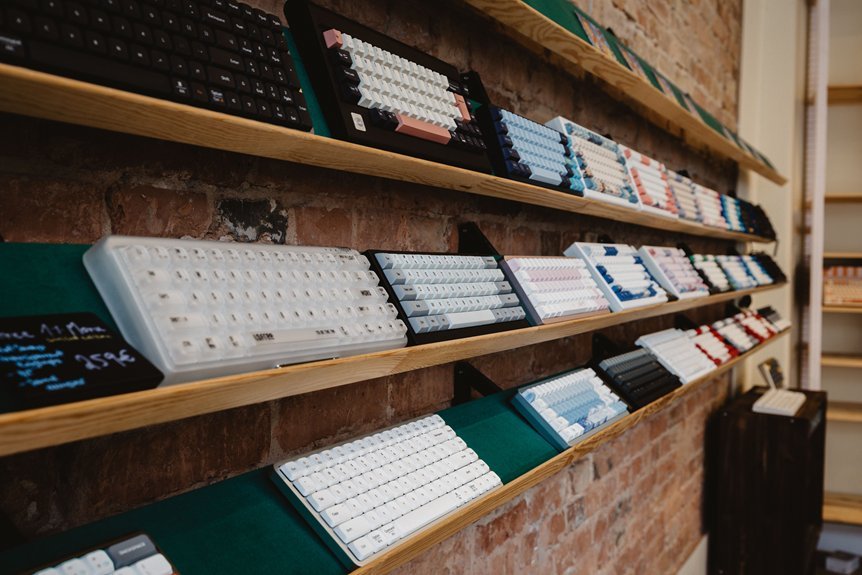
I’ve typed on planes, in hotel lobbies, and at noisy gates. A great travel keyboard feels like a steady co-pilot. You want fast response and a clean key sound. You want gear that slips into a bag and still feels solid in your hands.
Start with what frequent flyers actually carry. ProtoArc foldable keyboards open to near full size comfort. The hinge feels firm and the keys give a soft click. I like them for long emails in tight seats.
Logitech K380 keeps things simple and smooth. It pairs fast and switches devices with a tap. It feels like typing on a calm lake.
Crave a deeper press. Go compact and mechanical. Redragon K617 gives crisp feedback and a light frame. Ajazz AK820 Pro adds a richer thock sound and better key travel. These boards feel like a tiny typewriter in your bag.
Focus on what matters in transit. Keep it lean and reliable.
What I check every trip
- Bluetooth that reconnects fast
- Battery that lasts through a week
- Keys that feel stable under pressure
- Build that resists flex in a backpack
Pick one that fits your flow and space. Then you type anywhere and keep your pace.
ProtoArc XK01 Foldable Bluetooth Keyboard Full-Size
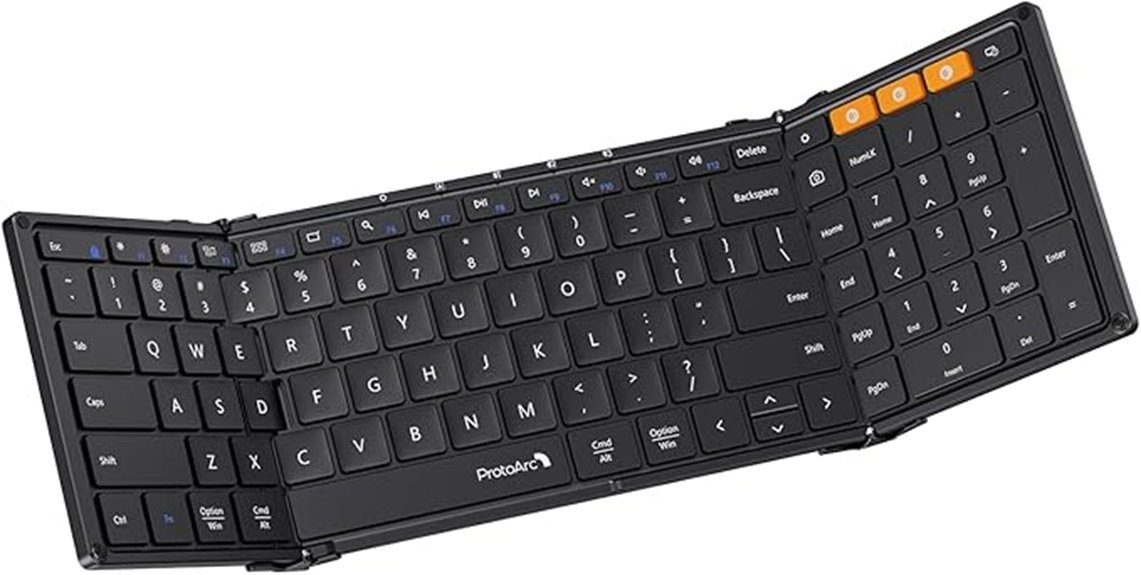
If you want a travel keyboard that feels like home, this one hits the sweet spot. I’ve used it in airports and cafés, and it opens flat in a snap. The hinge feels cool and solid under your fingers. It folds small, then spreads out like a book on a desk. You get a full 105 key layout with a numpad. Keys feel soft and quiet with a gentle click. Think of it as a pocket office that punches above its weight.
Pairing is quick with Bluetooth 5.1. I switch between a laptop and tablet in seconds. The keys stay responsive with no lag I can feel. USB C charging keeps things simple. Battery life stretches for months on standby. It plays nice with Windows and macOS and iOS and Android.
Best For:
Travelers and remote workers who want a full size typing feel in a foldable body. It fits in a bag like a paperback and works like a desk keyboard.
Pros:
- Full size 105 key layout with numpad and function row
- Smooth tri fold design that opens flat with a firm hinge
- Multi device pairing with fast switching
- Long battery life with USB C charging
Cons:
- Flat profile feels low on tilt for long sessions
- Bluetooth only connection limits some setups
- Folded size feels larger than ultra compact options
ProtoArc XK04 Foldable Bluetooth Travel Keyboard
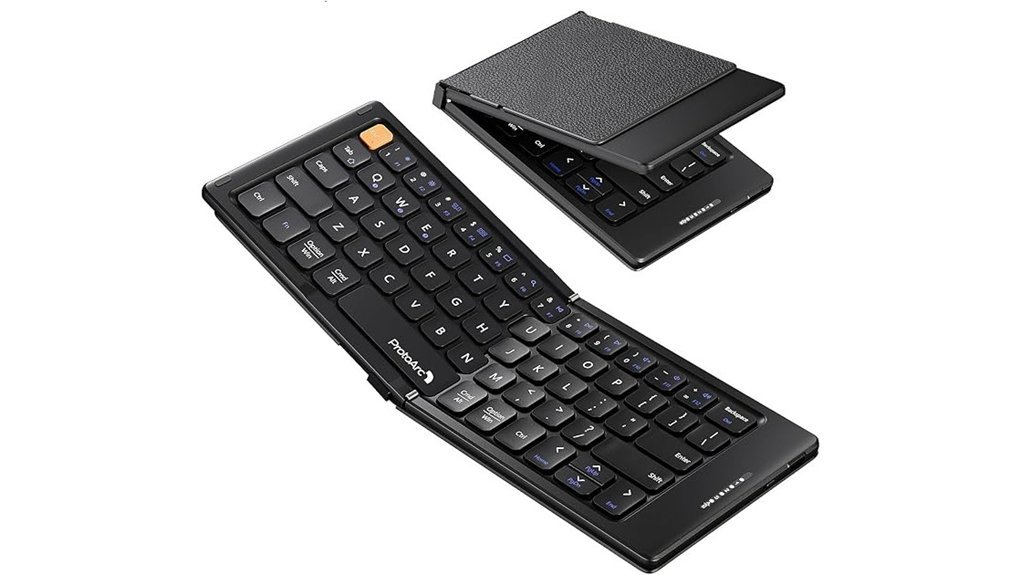
Frequent flyers love gear that vanishes in a pocket. I’ve carried the ProtoArc XK04 on packed flights and it feels like a deck of cards. The palm sized folding design clicks open with a soft snap. The PU leather feels smooth and grips well in hand. It weighs 7.8 ounces so your bag stays light. Open it and you get a 10.76 by 4.07 inch layout. It sits steady on a tray table like a book on a shelf. Great for quick emails and fast notes.
Pairing feels quick and clean. I switch between phone tablet and laptop with Bluetooth 5.1. No repeat setup. A two hour USB C charge powers long standby with auto sleep. You can tap a key and it wakes right up. I’ve written drafts in noisy gates and quiet cafés. It turns any stop into a *pocket office*.
Best For:
Frequent travelers and students and mobile pros who want fast typing on phones or tablets.
Pros:
- Folds small and slips into pockets or slim bags
- Connects to three devices and switches with a tap
- Long battery life with fast USB C charging and smart sleep
Cons:
- Compact keys feel tight at first
- Short key travel asks for a light touch
- Best for quick tasks and light sessions
Redragon K617 Fizz 60% RGB Mechanical Keyboard
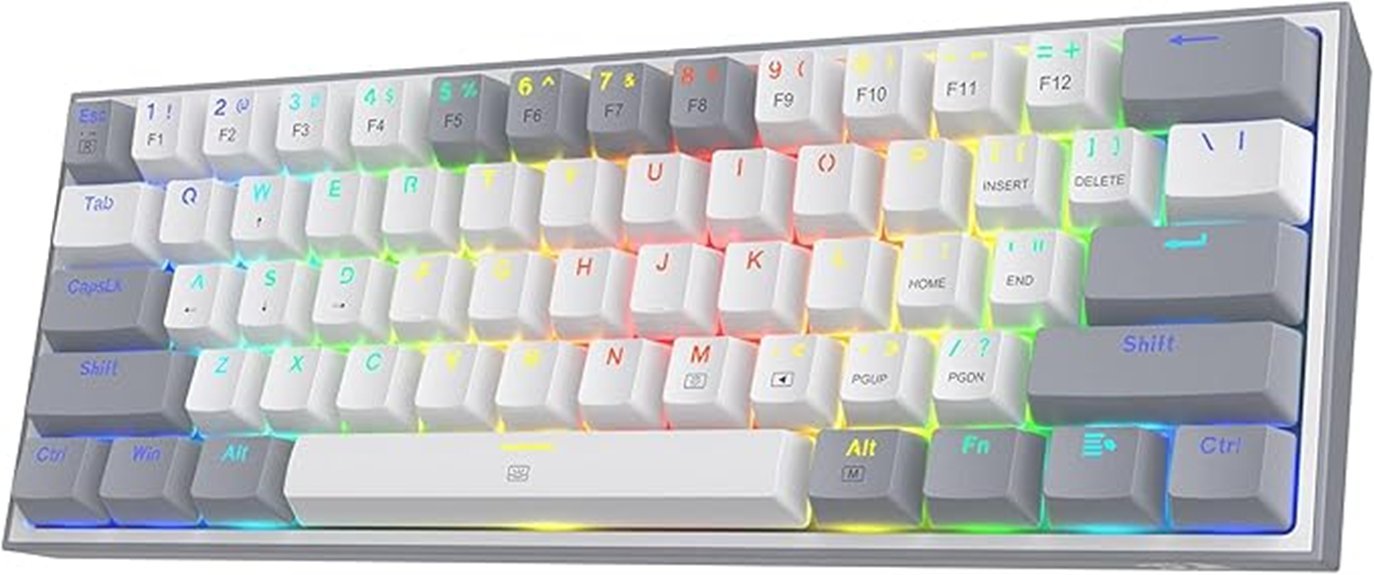
Designed for flyers who pack light, I tested the Redragon K617 Fizz on tight trays and small desks. You get a 60% layout with 61 keys. Your mouse finally has room to breathe. The linear red switches feel smooth and soft under your fingers. Keystrokes sound like a quiet whisper. Hot swappable sockets accept 3 or 5 pin switches. You can tune the feel like a chef seasons a dish. RGB lighting shows up to 20 modes. You adjust brightness and speed on the board. The software lets you set macros and keybinds. It’s wired for steady input. The white and grey caps look crisp in any setup.
Best For:
Gamers and minimalists who want a compact keyboard with sharp control. You gain space and keep speed, like cutting weight before a race.
Pros:
- Hot swappable sockets support 3 and 5 pin switches for easy customization
- Compact 60% layout frees desk space and boosts mouse travel
- RGB lighting offers 20 modes with onboard control and software tuning
- Smooth linear reds feel soft and quiet to the touch
Cons:
- You adapt to layered arrows and function keys with practice, like learning a new chord
- A wired link keeps input stable and asks for cable space
- Software adds depth for full control and invites a quick setup session
EPOMAKER Ajazz AK820 Pro Wireless Mechanical Keyboard
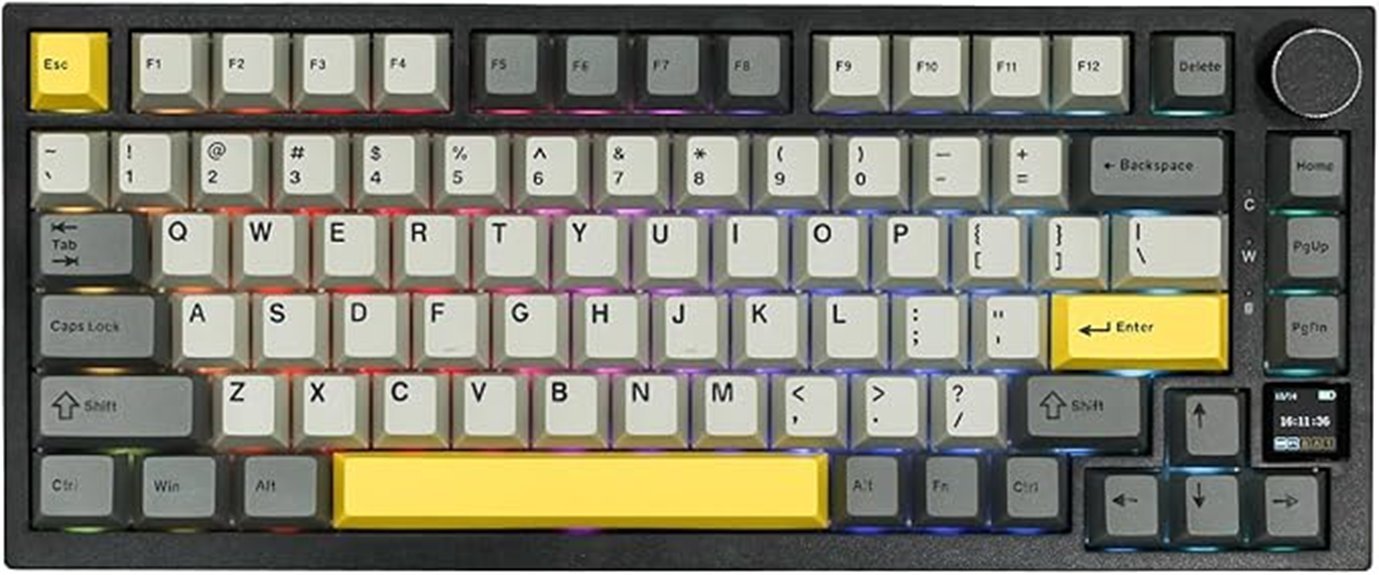
EPOMAKER Ajazz AK820 Pro Review
I’ve carried this board on flights and coffee runs. It feels like a pocket piano. Small size, big voice.
The *75% layout* keeps your arrows and function row. You save desk space. You still work fast. The gasket mount adds a soft bounce. Each press feels cushioned. The flex cut PC plate softens the sound. You hear a low thock instead of sharp clicks. It’s easy on your ears in quiet rooms.
Switch swaps take seconds. You pull and press. No solder. I tuned mine on a train. The board handled it fine. The tri mode wireless setup keeps you moving. Bluetooth for tablets. 2.4GHz for low lag. USB C for wired sessions. It connects like a Swiss Army knife.
Battery life holds strong. The 4000mAh cell lasts through long trips. The small TFT screen shows time and status. It adds a bit of flair. The knob feels grippy. Volume control stays smooth. RGB lighting glows clean through the keys. It adds mood in dim rooms.
It slides into a bag with ease. No bulk. No fuss.
Best For
Travelers and remote workers. Keyboard fans who want feel and freedom in one compact board.
Pros
- Tri mode wireless with wide device support
- Gasket mount and PC plate give a soft quiet sound
- Hot swap switches and RGB plus a handy screen
Cons
- ABS plastic feels light in hand
- 75% layout takes a few days to learn
- Screen adds style more than daily use
Quick Specs
- Layout, 75% compact
- Mount, gasket style
- Plate, PC with flex cuts
- Battery, 4000mAh
- Connectivity, Bluetooth 5.1, 2.4GHz, USB C
- Extras, TFT screen, volume knob, RGB lighting
If you want a travel keyboard that feels alive under your fingers, this one hits the mark. It sounds warm. It moves with you.
MageGee 60% Mechanical Gaming Keyboard MK-Box Blue Switch
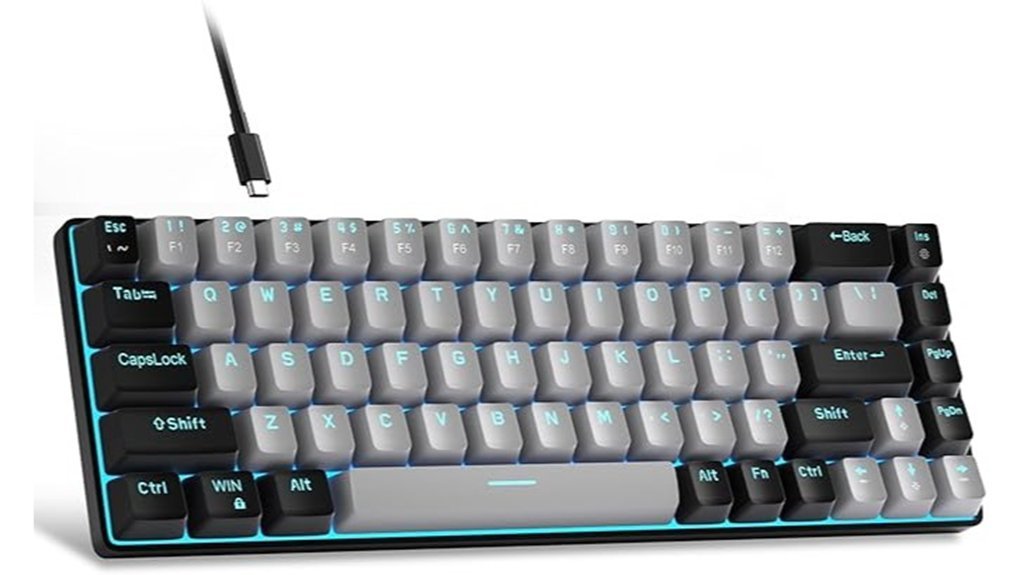
Click lovers, this one sings. I tested the MageGee MK Box on flights and in cafés. Each press snaps with a sharp tick you can feel in your bones. The blue switches give a crisp bump and a bright click. It feels like a typewriter in a carry on.
You get a compact 60% layout with 68 keys. Arrow keys sit ready. Shortcuts stay close. Your hands stay centered in tight seats. The board slips into a backpack like a paperback. Easy carry, no fuss.
The blue LED backlight glows cool and clean. I cycled through 15 modes in a dark cabin. You can tune speed and brightness fast. Keys stay clear at night. It sets the mood like a cockpit panel.
Build is light ABS that feels smooth to the touch. Feet tilt the board for comfort. A detachable USB cable packs fast and clean. Plug and play works across Windows, Mac, and Linux. Full anti ghosting keeps inputs true during fast play. It just works.
Best For: You travel light and want a clicky board with arrows and simple lighting.
Pros:
- Blue switches click loud and feel sharp, great for typing and games
- 68 key layout saves space and keeps arrows handy
- Blue LED offers 15 modes with easy control and clear night view
- Anti ghosting tracks every press during quick combos
Cons:
- Click sound cuts through quiet rooms, think library hush
- ABS case feels light in hand, less heft than metal
- Blue only lighting keeps color simple, no RGB mix
Logitech Pebble Keys 2 K380s Bluetooth Keyboard
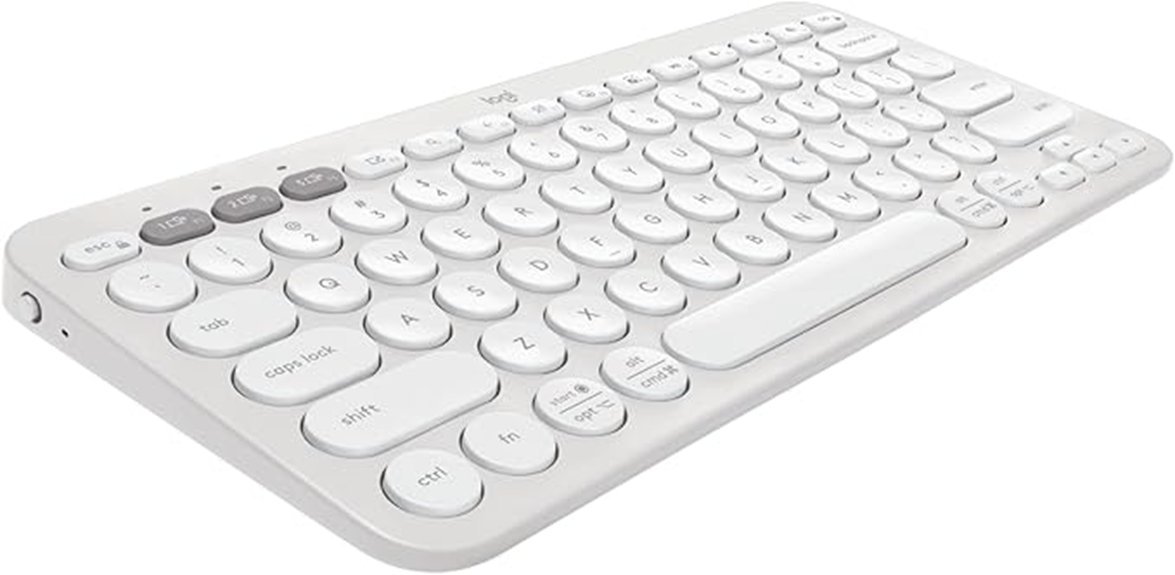
Frequent flyers juggle gear like a circus act. I’ve used the Pebble Keys 2 K380s on planes and in cafes, and it keeps up. You pair a laptop, tablet, and phone, then tap Easy Switch buttons to jump between them. It feels instant. No hiccups.
The board slips into a bag like a notebook. It feels light in hand. The finish feels smooth and cool. Colors stay clean and low key. It blends in anywhere.
Typing stays quiet and comfy. The scooped round keys guide your fingers like a well worn path. You get a soft, muted click. It feels close to a laptop. I type fast and stay accurate.
You can tweak keys in Logi Options. Shortcuts save time each day. The battery runs up to three years. That kind of stamina feels like a marathon runner.
Best For: Travelers and multitaskers who want fast device switching on the go.
Pros:
- Easy Switch Bluetooth pairs with up to 3 devices across iOS Android Windows and macOS
- Slim build and light weight with a soft quiet key feel
- Long battery life with shortcut control via Logi Options
Cons:
- No backlight in dark cabins
- Flat shape feels basic for long desk sessions
- Full features come through the Logi Options app only
ProtoArc Foldable Keyboard and Mouse Combo XKM01
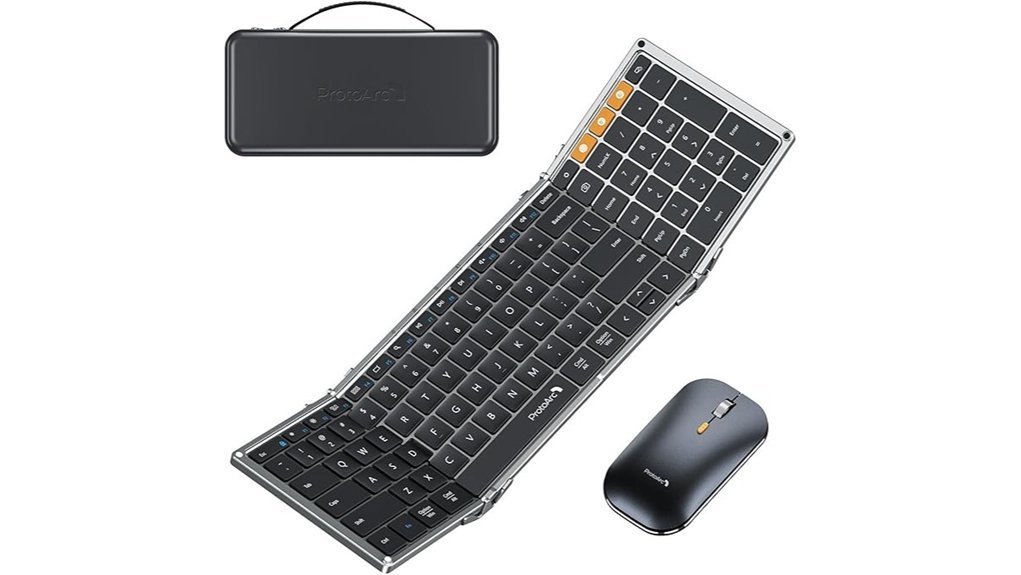
The ProtoArc XKM01 feels like a pocket office. I used it on flights and in cafes. It opens fast and clicks into place like a switchblade.
You get a *full size 105 key* folding keyboard with a number pad. Typing feels firm and quiet. Keys give a soft thock that keeps meetings calm. The *slim quiet mouse* glides smooth and keeps clicks low.
Switching devices feels instant. I jumped from laptop to tablet to phone with ease. It pairs through Bluetooth and 2.4G. That flexibility pays off during busy travel days.
Packing stays simple. The hard case feels solid in your bag. The stand holds 4 to 11 inch devices at a good angle. Aluminum hinges feel cool and tight in hand. They handle heavy use like a well oiled door.
Battery life holds strong. USB C charging keeps things modern. I worked for days without reaching for a cable. That peace of mind matters on the road.
Best For:
Frequent travelers and remote pros who want a full desktop feel in a compact kit.
Pros:
- *Full size 105 key keyboard* boosts speed and accuracy
- *Multi device support* lets you switch across three devices fast
- Travel kit includes hard case and stand for quick setups
Cons:
- Fold joints add slight flex during intense typing
- Setup takes a moment during quick stops
- Mouse size feels small for long desk sessions
If you want a travel setup that punches above its weight, this one hits like a Swiss Army knife.
TECKNET Wireless Keyboard and Mouse Combo 2.4GHz
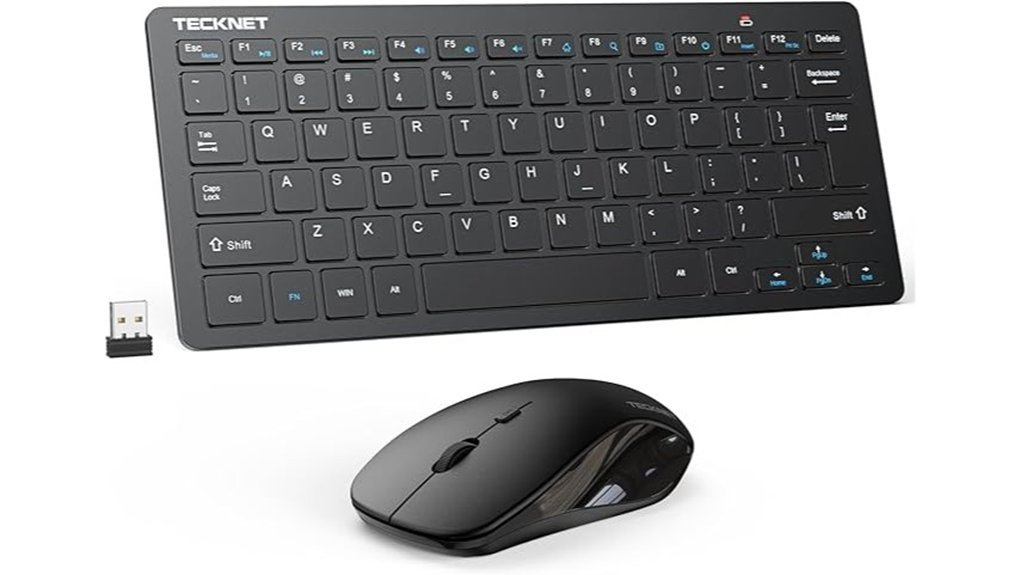
If you want a compact, quiet setup for travel, I’ve used this combo on planes and in cafés and it fits like a glove. You slip the ultra slim keyboard and mouse into any bag with ease. Keys feel soft under your fingers. Clicks stay whisper quiet, like a library at dawn.
You plug one nano receiver and both devices connect fast. The 2.4GHz link stays steady up to 49 feet. I typed across a hotel room with zero lag. It works on Windows, Mac, Chrome OS, and Android TV. Auto sleep saves power so batteries last longer. The build feels solid in hand, like a trusty pen you keep.
Best For:
Travelers and students who want a compact quiet setup on the go, like carrying a small notebook that always works.
Pros:
- Ultra slim build that slides into tight bags
- Quiet keys and silent clicks that keep focus sharp
- Single USB receiver that pairs both devices fast
Cons:
- Needs AAA batteries for both units
- Uses USB receiver instead of Bluetooth
- Lacks extras like backlight or custom keys
Quick Specs:
- Connection: 2.4GHz wireless
- Range: up to 49 feet
- Keyboard type: scissor switch
- Power: AAA batteries
- Compatibility: Windows, Mac, Chrome OS, Android TV
You get a clean setup that travels light and types smooth. It feels simple and ready every time.
Sungwoo Foldable Silicone USB Wired Waterproof Keyboard
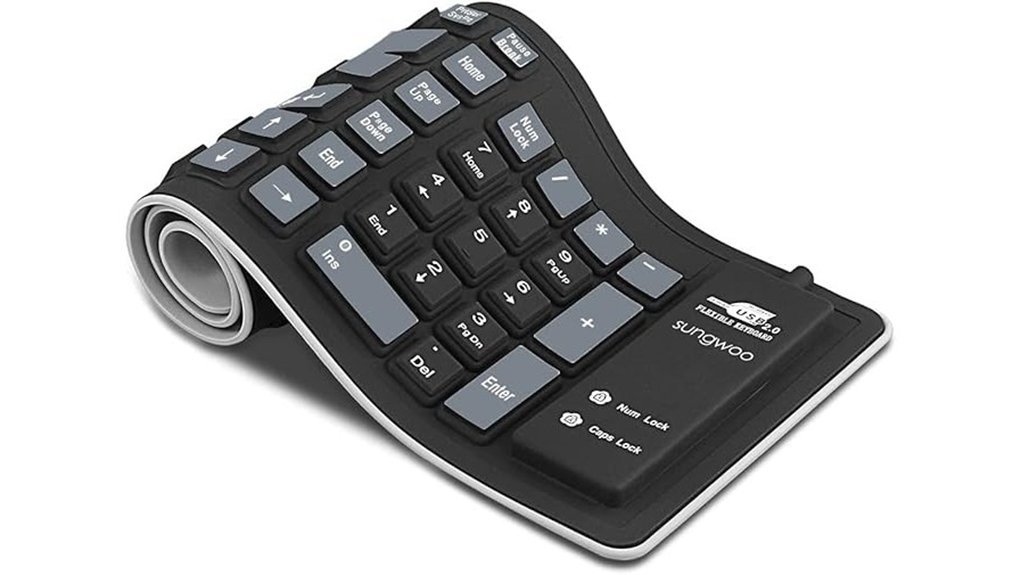
Quiet travel calls for soft keys. I’ve used the Sungwoo Foldable Silicone USB Keyboard on planes and in hotel rooms. It feels like a smooth rubber mat under your fingers, soft and almost silent. Think library quiet.
You get a *high elasticity silicone build* that feels flexible and clean. It carries zero odor and feels skin safe. I roll it up like a sushi mat and slip it in my bag. It weighs very little and springs back fast.
Typing stays quiet and low impact. You keep peace on red eye flights and late nights. Keys feel soft with a gentle rebound. Expect a different rhythm than rigid boards.
Cleaning feels easy as pie. I rinse it under water and wipe it with alcohol. The surface dries fast and stays fresh. The waterproof and dustproof design keeps grime away.
It plugs into USB and works with laptops and Macs. Setup takes seconds. I keep it flat and avoid hard pulls so it stays in good shape.
Best For: Travel, remote work, study in shared spaces.
Pros:
- Flexible silicone body folds and rolls with ease
- Waterproof shell allows quick rinse or wipe
- Silent keystrokes suit planes and late hours
Cons:
- Soft key feel creates a learning curve at first
- Gentle handling keeps the shape consistent over time
- USB cable suits desks and favors simple plug and play setups
If you want a spill proof typing option that travels light, this one fits like a glove.
Samsers Foldable Bluetooth Keyboard and Mouse Combo
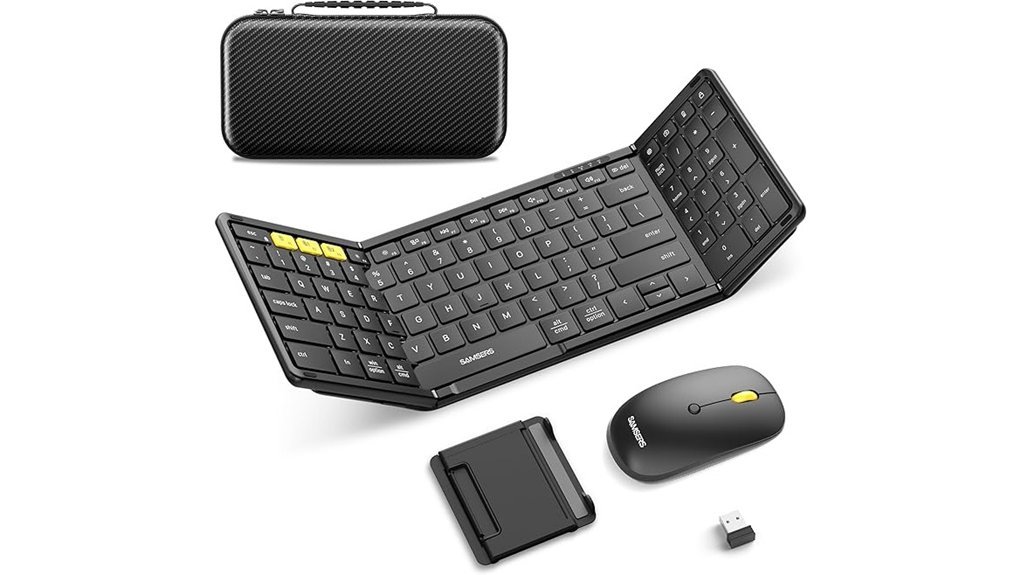
Frequent flyers juggle gear like circus acts. I’ve used the Samsers foldable combo on planes and in cafés. Its triple device connectivity keeps you in sync. You pair two devices with Bluetooth 5.0. You add a third through the 2.4G receiver. One tap and you switch across Windows, Mac, iOS, or Android. It feels like flipping channels.
You get a full size layout with a numeric keypad. The scissor keys feel soft and quiet. Each press gives a light click you can feel in your fingertips. I type fast and it keeps up. The contoured mouse sits smooth in your palm. DPI adjusts for tight edits or wide sweeps. It tracks like a steady compass.
Travel light. This kit weighs 21 ounces. It folds into a slim case that holds every piece. The hinge feels firm after weeks of use. A quick 2 to 3 hour charge powers up to 120 days of standby. It keeps going like a camel in the desert.
Best For: You travel often and switch between phone, tablet, and laptop. You want a compact kit with a familiar typing feel.
Pros:
- Triple device support makes switching fast and smooth
- Full size keys boost speed and comfort
- Foldable build with case fits any bag
Cons:
- Folded frame feels a bit flexible on soft surfaces
- Recharge cycle adds one more task to your routine
- Compact mouse feels small during long sessions
Factors to Consider When Choosing a Travel Keyboard
I’ve tested plenty of travel keyboards in cramped planes and noisy cafés, so I focus on what actually holds up. Size matters first. You want a compact board that slips into your bag like a paperback yet still feels right under your fingers.
Next comes connection. I prefer Bluetooth that pairs fast and stays steady. A flaky link feels like typing through mud. Battery life also counts. You want power that lasts through long trips without a scramble for a charger.
Compatibility keeps things smooth. Your keyboard should sync with your laptop, tablet, or phone without fuss. Switching devices should feel like flipping a light switch.
Typing feel seals the deal. Keys should have a soft click and a firm return. Think of it like a good handshake. You’ll type for hours, so comfort keeps your flow steady even in a busy terminal.
Portability And Size
A travel keyboard can make your setup feel slick or clumsy. I always pick compact and light builds that slip into my bag with ease. Think tri fold or palm size. They feel like a small notebook in your hand. Smooth and easy to grab.
Weight matters on long days. Keep it under a pound. Your shoulders will thank you by hour six. I’ve felt the difference on crowded trains and tight airport lines.
Size drives convenience. Aim for folded length near eight to ten inches. That size fits most sleeves and side pockets. It keeps packing simple and repeatable.
Tight spaces call for smart design. Foldable or roll up boards shine on airplane trays. You tap and hear a soft click even in a noisy cabin. It feels controlled and quiet.
Durability seals the deal. Look for aluminum hinges and water resistant shells. They feel cool and solid in your hand. Frequent packing and shifting climates test every joint. A sturdy build holds up and keeps your typing smooth mid trip.
Quick specs I check every time:
- Weight under one pound
- Folded size near eight to ten inches
- Tri fold or roll up design
- Aluminum hinge or reinforced joint
- Water resistant finish
Pick wisely and your keyboard travels like a loyal sidekick.
Connectivity Options
Because you juggle a phone, tablet, and laptop, I always pick a keyboard with strong Bluetooth. It should pair with three devices. Switching should feel instant, like flipping a light switch. I tap a key and jump screens without a hiccup. That flow matters in a busy airport.
I like boards that keep cables out of sight. Clean desks feel better. Keys should sound soft and tight under your fingers. A range of about 33 feet gives you freedom. I’ve typed from a hotel bed while the laptop sat across the room.
Older gear still shows up in real life. I carry a keyboard with a 2.4GHz USB receiver as a backup. It plugs in fast and just works. No fuss.
Compatibility saves time and stress. Your keyboard should support:
- Windows
- macOS
- iOS
- Android
I check for easy device switch keys every time. One tap keeps your rhythm steady. Think of it as a conductor guiding an orchestra. You stay in control and your workflow stays smooth.
Battery Life
Battery Life
I’ve tested keyboards on long flights and crowded cafés. Power decides everything. A dead board feels like a flat tire.
Look for long standby time****. Some hit 150 days. That means fewer charges and less stress. You grab it and go.
Charging speed matters. I like boards that fill in two to three hours. You plug in, grab coffee, and you’re back. Simple.
Auto sleep helps a lot. The keys go quiet when you stop typing. Power stays saved for later. Think of it as a light switch for your battery.
Multi device support should stay efficient. I’ve seen boards juggle three devices with ease. No heat. No drain spike. Smooth switching keeps your flow.
Go with rechargeable batteries. They feel lighter in your bag. You skip the hunt for spare cells. It keeps your setup clean and simple.
Here’s what I check fast:
- Standby time, aim for 100 days or more
- Charge time, under three hours feels right
- Auto sleep, fast trigger saves power
- Multi device support, stable and low drain
- Recharge type, USB C feels modern
A good battery keeps pace with your trip. From takeoff hum to hotel desk taps, your keyboard stays ready. Like a steady travel buddy that never flakes.
Typing Comfort
Typing Comfort
I’ve typed on planes and shaky café tables. Your fingers feel every flaw. Comfort drives speed and focus.
Low profile keycaps feel like a laptop. Your fingers glide with a soft touch. The plastic feels smooth and cool. You keep a steady rhythm like a well tuned drum.
Scissor switch keys sound quiet. Each press lands with a gentle tap. Your hands relax through long sessions. That soft landing saves energy.
Full size layouts help if you use numbers. I move faster with dedicated keys. Shortcuts feel natural and quick. It’s like having the right tool in reach.
Adjustable angles change everything. Kickstands lift the board to fit your wrists. Your posture lines up and stays steady. Small tilt shifts cut strain fast.
Ergonomic shapes support your palms. A cushioned wrist rest feels soft and warm. You type longer with less fatigue. Comfort builds over hours.
Tiny details matter. Key spacing guides your fingers. Key travel feels crisp and controlled. You get precise hits every time.
What to look for
- Low profile keycaps for a laptop feel
- Scissor switch keys for quiet presses
- Full size layout for numbers and shortcuts
- Adjustable kickstand angles for wrist alignment
- Cushioned wrist rest for long sessions
- Balanced key travel for clean feedback
Pick a board that fits your flow. Your hands will thank you.
Device Compatibility
Device Compatibility
I’ve tested keyboards in airports and cramped trains. Keys should feel smooth under your fingers and clicks should sound soft in quiet cabins. Compatibility keeps your flow steady.
You carry a laptop a tablet and a phone. One keyboard should handle them all. Pick support for Windows macOS iOS and Android. You switch fast and stay in rhythm.
Look for multi device pairing. I like three devices at once. Tap a key and jump screens. It feels like flipping channels.
Bluetooth matters. Choose Bluetooth 5.1 for strong range. Signals stay stable in busy terminals. Fewer hiccups. More work done.
Check tablet and phone support. Some boards favor laptops. I want equal love across screens. Apps respond cleanly.
Dedicated switching keys save time. I press once and move on. No setup dance. No cables on your tray table.
Think of it as a Swiss Army knife for typing. One tool. Many jobs. Your workflow stays smooth wherever you land.
Build Durability
Build Durability
I’ve packed these boards in tight bags and slammed them on tray tables. *Durability sets your travel pace.* You want a keyboard that shrugs off drops and constant folds. Think of it as a road warrior that takes a beating and keeps typing.
Feel the hinge. It should close with a firm click. No wobble. No creak. Reinforced hinges handle high fold cycles and keep the halves aligned. That steady feel saves you mid flight.
Weight matters. Strength matters too. *Aluminum shells feel cool and solid in your hands.* High grade plastic cuts grams and stays tough. Both keep your bag light and your gear safe.
Keys tell a story. I prefer scissor switches for a crisp snap. Silicone domes give a soft thud that stays quiet in cafes. Each press should feel consistent and clean.
Spills happen. Dust finds a way. Look for sealed designs with water and dust ratings. A quick wipe should restore that smooth glide.
Track records count. I trust models that survive long test logs and repeat trips. Fancy extras fade fast. *Reliability wins every mile.*
Quick checks you can use in seconds:
- Reinforced hinge with tight lock feel
- Aluminum or high grade plastic chassis
- Scissor or silicone keys with quiet sound
- Water and dust resistance rating
- Proven durability from long term use
*A tough build pays you back like a good pair of boots.* It saves money and time on every trip.
Conclusion
You want smooth keystrokes on the move. I’ve tested these travel keyboards on planes and in cafés. Keys should feel crisp and quiet. Think soft taps and a gentle click. Like a good pen on fresh paper.
Pick the right travel keyboard
You need a board that fits your bag and your habits. Size matters. Key spacing matters more. I look for steady Bluetooth and fast wake. A good board feels like second nature. Like a compass that points true.
*Top features I check first:*
- Key feel, soft press with clear feedback
- Size, slim yet full key pitch
- Battery life, weeks not days
- Connectivity, stable Bluetooth pairing
- Build, solid hinge or frame
Typing on a tray table
Airplane trays test every keyboard. Space feels tight. Your wrists hover. A compact board keeps control in your hands. I’ve typed through turbulence and coffee spills. The best models stay planted. Like a rock in a stream.
Keys should sound muted. You avoid side eye from neighbors. The surface should grip. Rubber feet help a lot. You stay in flow from takeoff to landing.
Foldable vs rigid builds
Foldable boards pack small. Hinges add a slight flex. Some feel like typing on a thin notebook. Rigid boards feel firmer. They take more space yet reward you with stability. Pick your trade off. It’s a coin toss with clear sides.
I lean foldable for short trips. I grab rigid for long writing sessions. Your hands will tell you fast.
Battery and pairing in real life
You want power that lasts. I charge once and forget it. Weeks pass with steady use. Pairing should feel instant. Open the lid and type. No fiddling. Like flipping a light switch.
Multi device support helps. Switch from phone to tablet in a tap. That rhythm saves time.
Final take
You carry your office in a small pouch. The right keyboard makes any seat a desk. Your fingers find a steady beat. Every place feels ready for work. Like home for your hands.